Written on July 31, 2010 by Sarah Ward
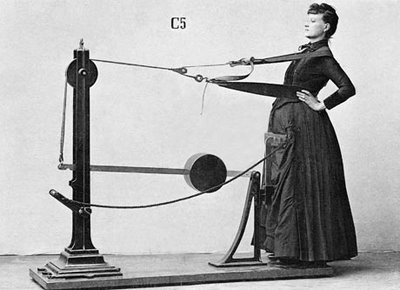
Zander Machines, designer by Dr. Gustav Zander
Considering that 64% of Americans are overweight (Center of Disease Control), it’s understandable that millions of Americans are taking efforts to maintain a healthy body weight. While diets may seem like they’ve become popular in the last 50 years, you may be surprised to learn that people have been dieting since the 1800s! For the next few days, we will explore diet fads from the 1800s, 1900s, and the millennium.
Diet Fads from the 1800s:
- Vinegar Diet. How would you like to eat food that had been soaked in vinegar? That’s exactly what the British poet, Lord Byron, did and reportedly lost 60 pounds by this simple method. There is speculations among historians whether he had an eating disorder.
- Graham’s Diet. The creator of the Graham Cracker, Sylvester Graham was a Presbyterian minister with strong opinions on diet. He taught his followers, “Grahamites,” to avoid coffee, alcohol, tea, spices, and meat. Instead, they subsisted on a diet of pure water, fresh fruits and vegetables, high fiber foods, and whole wheat. Strange, one might have thought their diet would have been based on graham crackers…
- Zander Machines. The Swedish doctor, Dr. Gustav Zander, developed a peculiar concept to lose weight that involved wrapping one’s body in a vibrating strap, a method that can be seen in old movies.
- Banting Diet. The first popular diet book was called “Letter on Corpulence” and written by an English casket maker named William Banting who battled with his weight. His diet concept included eating dry toast, lean meats, unsweetened fruit, and green vegetables.
While some of these concepts are still practiced today, many further developments have been made on diets since the 1800s. If you’re looking to establish a diet routine, a certified nutritionist or dietitian can help you construct a diet that will take into consideration your eating, exercise, and weight loss goals. Nutritionists with online degrees can help you achieve optimum health. Find a nutritionist in your area at http://www.findanutritionist.com/.
If you were to choose one of these diet fads from the 1800s, which would it be? Graham’s Diet would be my choice.
Stay tuned for Diet Fads from the 1900s!
History of Dieting: Questionable Diet Fads from the 1900s
History of Dieting: Today’s Diet Fads
Source Diet Fads: Some Smart, Some Scary
Category: Crazy, Healthcare
Written on July 30, 2010 by Sarah Ward
To stay connected with your online school community, an essential component of a student’s guide to computers is a reliable internet connection. When considering an internet connection, people often choose based on price, speed, and dependability.
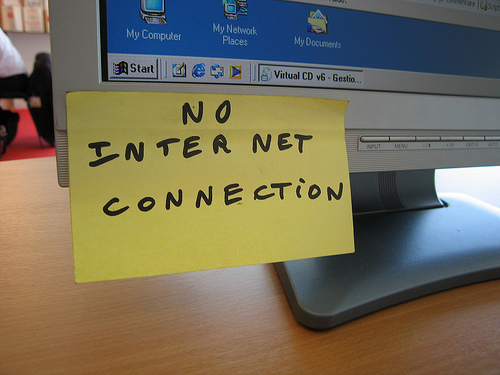
A Student’s Guide to Computers for Online School: Internet Connection
A spotty internet connection can translate into delayed email notifications and even late assignments, which has the potential to diminish your GPA at your online school.
Wired vs. Wireless
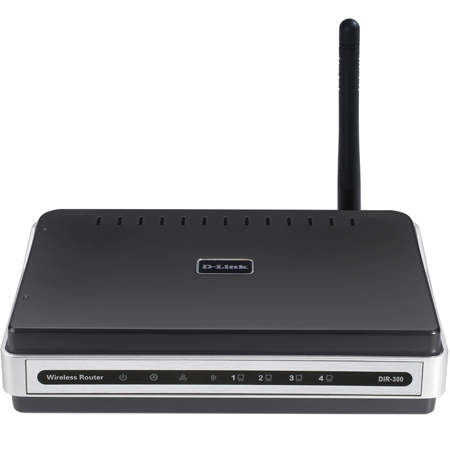
Wireless Router
The days of dial-up internet are behind us leaving the options of direct internet connection through a network cable or a wireless router. Particularly for laptop owners such as myself, having wireless internet is a big perk.
Wireless internet is achieved through a wireless router which, in many cases, is provided with the subscription of internet services by your local provider. Since there is a wide range of routers, it’s best to do some research or talk to the person at the electronic store to determine what the best choice would be for your needs. There may be rental options available also.
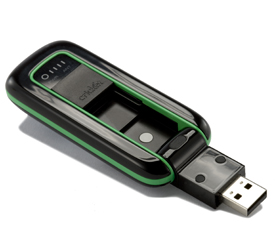
Wireless Broadband
Some cell phone providers even have wireless broadband services that allow you to connect to the internet at home and anywhere you go with no cables or fuss.
Check out your local internet service providers and compare different options based on your needs. As an online school student on a budget, you may want to consider sharing an internet connection with your neighbor to cut the bill in half.
Do you have a preference between wired and wireless internet?
Category: Life, Online Education, Tools
Written on by Sarah Ward

What Not to Do Online? Lie about your reason for taking time off, like Kevin Colvin did. Busted!
It’s important to be careful about our dealings with social media, particularly in matters concerning employment. If you don’t value your job anymore, here’s some great ways to lose it by misusing the internet.
What Not to Do Online Lesson #7: Slack At Work
We get that the Facebook game, FarmVille, is addictive with over 82 million players throughout the world. There’s a time and a place for play, however, and on the company’s clock is not one of them. Several Bularian City Council members were caught on Farmville during a meeting and were lectured about wasting company time. One politician, Dimitar Kerin, just couldn’t kick the habit and lost his place on the committee.
What Not to Do Online Lesson #8: Lie About Time Off
If you need to take time off work, don’t lie about what it’s for. Back in 2007, a bank intern for Anglo Irish Bank, Kevin Colvin, asked for time off to go to New York for a “family emergency” and then was busted by an incriminating photo uploaded to Facebook from a Halloween party he ditched work to attend. Even if you do everything you can to fabricate the perfect story, you never know who will tag you in a photo on Facebook during your personal “emergency” and bring it all tumbling down.
What Not to Do Online Lesson #9: Tweet About Job Offers
Conner Riley, also known as @theconnor, tweeted about getting a job offer: “Cisco just offered me a job! Now I have to weigh the utility of a fatty paycheck against the daily commute to San Jose and hating the work.” Shortly thereafter, she received a reply from Tim Levad with Cisco Alert, saying, “Who is the hiring manager. I’m sure they would love to know that you will hate the work. We here at Cisco are versed in the web.” All it takes is one errant thought to tweet yourself out of a job. Better to play job offer cards close to the chest.
To learn better what not to do online, earn an English / Language Arts degree online. It will help you understand the power and effect of your words, effectively preventing you from making mistakes like these so you can keep your job and enjoy a long and prosperous career.
What Not to Do Online Part I
What Not to Do Online Part II
Source: 10 Social Media Blunders
Category: Business, Crazy
Tags: social media
Written on by Sarah Ward
As you prepare to start your first semester of online school, you’ll definitely need a computer. This series is designed for students that aren’t tech-savvy and may not be familiar with all the computer terminology. Whether you have a laptop or desktop, from time to time, you’ll likely need to upgrade your RAM.
A Student’s Guide to Computers for Online School: Upgrading RAM
 Has your computer processing slowed down to a crawl? Does it take forever to open up documents and the internet? Is your computer slow as molasses? These are some tell-tale signs that you may need to upgrade your RAM. RAM stands for Random Access Memory and is essentially your computer’s memory. RAM is is an affordable way to upgrade your computer, and improve its speed and functionality without shelling out money for a brand new computer.
To break to down for you, RAM is temporary memory on your computer. In other words, while you are working on an essay in Word with several additional documents open for research, your computer’s RAM is temporarily saving your work until you hit save. Once you save it, your essay is saved to the hard drive for permanent storage. When you click “save,” your overwhelmed RAM is relieved of the pressure of having to juggle so much information and things speed up on your computer.
If you’re not sure how to install RAM yourself, you may seek help from your favorite computer tech or electronic store. One thing to keep in mind is this might void your manufacturer’s warranty. If you have a Mac, contact your local Apple store and get their professional advice about how to improve your computer’s performance.
Online school shouldn’t take any longer than it needs to, and upgrading your computer’s RAM can help speed up your computer’s operating system which will help speed up the whole educational process.
Have you ever upgraded the RAM in your computer? Has it helped improve the speed of your computer?
Category: Online Education, Tools
Written on July 29, 2010 by Sarah Ward

Fall presents an opportunity for a fresh start for students as it begins a new school year. One of the benefits of online school is that most programs allow you to start anytime — you don’t have to wait for September.
As an online student, one thing you can’t do without is a computer. If you aren’t familiar with technology, choosing a computer may seem like a daunting task, but things will seem simpler with today’s blog as we break down computers into digestible pieces that make sense.
When we strip everything else away, computers comprise of two parts: hardware and software. Hardware refers to the physical components that can be seen and touched, whereas software refers to the systems working when the computer is on. The first part of purchasing a computer will require getting the right hardware and type of computer which we will look at today.
A Students Guide to Computers for Online School: Desktop vs. Laptop?
 Brands aside, you can choose from two types of computers: desktops and laptops. Desktops are stationary and usually used on desks at offices and schools, while laptops are a portable computer that can sit on your lap, as the name implies.
Laptops are a popular choice among students as they provide flexibility and freedom, allowing them to take notes directly onto their computer. Laptops are typically more expensive when compared to their desktop counterparts and can be harder to customize. Since a laptop is so mobile, it’s easy to find yourself easily distracted on the couch in front of the TV trying to study on your laptop.
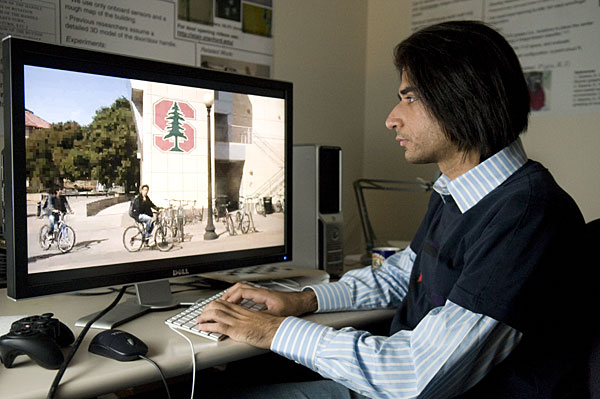
Graduate student Siddharth Batra. Photo c/o Stanford
Desktop computers have one obvious drawback — they can’t go anywhere. While that can be a negative, it can also be seen as a positive since the set up computer workspace can be dedicated to online school, helping to prevent procrastination. Desktops are more affordable and customizable with many possible options for monitor, keyboard, and mice. Desktops typically have better quality built-in speakers compared to the onboard speakers on a laptop.
Which computer you choose for online school will depend on your preferences, budget, and personal work style. Personally I have used both laptop and desktop computers for education and see the benefits with both.
What is your preference? Desktop or laptop?
Category: Education, Online Education, Tools
Written on by Sarah Ward

Tiger Wood’s Nike Commercial After the News Hit the Fan
When news of Tiger Woods’ scandalous affairs hit the media, he had held the position of highest-paid athlete worldwide for several years running. Much of this income was derived from multi-million dollar sponsorships from large corporate conglomerates such as Nike, Buick, and AT&T. After his wholesome, role-model personal and professional image was tarnished as the news hit the fan, there were those who thought that it wouldn’t have an effect on his endorsements. Unfortunately that wasn’t the case.
The Impact of Infidelity: Tiger Woods
Despite the public apology for his infidelity, celebrity endorsement deals with Gatorate, AT&T, and Accenture fell through. While he retained his endorsement contracts with Gillette, Tag Heuer, and Louis Vuitton, he was taken out of the limelight in their campaigns. Woods’ infidelity cost him his marriage and $12 billion worth of endorsements.
The Impact of Infidelity: Kobe Bryant
Kobe Bryant was accused of sexual assault in 2003 in an adulterous encounter with another woman, leading to trouble with the law and the loss of two endorsement deals. In spite of a public apology and settling the case, both Nutella and McDonald’s allowed their multi-million dollar contracts with Bryant to expire.
Considering the tremendous loss that infidelity can have both personally and professionally, investing in marriage therapy can be worth its weight in gold. Therapy can help partners work through issues, learn to communicate and clearly express their needs, and resolve conflict, potentially preventing embarrassing public scandals, lost celebrity endorsements, and divorce.
Category: Celebrity, Healthcare
Written on July 28, 2010 by Sarah Ward
This week we caught up with Toronto-based Interior Designer Erica Swanson about how her education has had an impact on her career.
Question: How did your education help prepare you for your career?

Answer: My education has been integral to my success. An ‘eye’ for design is not enough; a firm grasp of basic business principles is essential to succeed in this industry. If you can’t manage the project, your team, the budget or administer the process while you’re also keeping your hands on the wheel of your business, no amount of “make pretty” will keep you afloat. An education is crucial; I wouldn’t be where I am today without the confidence and skills my education provided.
Now we pose the question to you: How has your education helped equip you for your career?
 Erica Swanson’s Bio: I’m an Interior Designer which is a fancy-pants way of saying I create kick-ass spaces for wickedly cool people. I listen. I translate. I initiate. And then I deliver you, You. I do that with my ‘Design on the Dirty’ virtual design services available anywhere in North America. With laser-focused intuition, I create customized design and decorating plans delivered digitally or right to your doorstep. Because it isn’t about this year’s hottest paint colour, this year’s trends, or what the Jones’ are doing. It’s about you. You can find me at www.ericaswansondesign.com and on Twitter @erica_swanson where I post about creativity, art and interior design. But don’t just take my word for it; I’ve been featured on national television, radio, in books, magazines, and in both of Canada’s national newspapers. So what are you waiting for?
Category: Art & Design, Art & Design, Career, Interviews
Tags: guest post
Written on by Sarah Ward
 If you’ve ever been stopped in traffic at a stop light and looked over to see the dude next to you picking his nose in his car, you’re well aware of transparency. In addition to deciding when is a safe time to, well, dig for gold, care ought to be taken for our online dealings as well. Here’s Part II of What Not to Do Online (click here for part I).
What Not to Do Online Lesson #4: Share Confidential Information
How would you like your medical records being discussed on Facebook? Five nurses from Tri-City Medical Center were fired for breaching patient confidentiality online. Keep confidential information classified.
What Not to Do Online Lesson #5: Affiliate With Known Terrorists
Yes, some things should go without saying. This ought to be one of them. Recently a group of 11 Afghan military training at an Air Force base in Texas went AWOL. The majority of the AWOL military were tracked down with the help of Facebook. In the process, it was discovered that several were connected to friends who had Al Qaeda connections. Be careful who you connect with on the internet, because this likely won’t bode well for their military careers.
What Not to Do Online Lesson #6: Threaten Your Colleagues
It’s easy to take things out of context online, such as threatening to bomb your place of work. David Noordewier, a former Wal-Mart employee, remarked on his MySpace page that the average person’s IQ would go up if a bomb were dropped on Wal-Mart stores. His superiors found out about the social media post and he was escorted out of the building. The takeaway for Noordewier? “If you have a MySpace site, you better act like you’re a politician,” he said. “Be politically correct and don’t try to be funny.”
To learn better what not to do online, earn a communications degree. In the meantime, stay tuned for What Not To Do Online, Part III!
What Not to Do Online Part I
What Not to Do Online Part III
Source: 10 Social Media Blunders
Category: Business, Healthcare
Tags: nursing, social media
Written on July 27, 2010 by Sarah Ward
 With practically the whole world online these days, the things we say or do on the internet aren’t as private as we may think they are. In an eye-opening study by Proofpoint, Inc., 8% of companies with more than 1,000 employees have fired someone for bad online behavior. In order to remain happily employed, here is the first article in a 3-part series of what not to do online.
What Not to Do Online Lesson #1: Bash Your Boss
In 2009, Philadelphia Eagles employee Dan Leone publicly criticized the company for losing star player Brian Dawkins to the Denver Broncos. His Facebook status read: “Dan is [expletive] devastated about Dawkins signing with Denver … Dam Eagles R Retarted!!” Leone told the Inquirer that even though he removed the comment, it led to losing his job only days later.
Word to the wise: don’t bash your boss online.
What Not to Do Online Lesson #2: Complain About Your Customers
We’ve all had difficult customers and it’s natural to want to vent. Just don’t it online. Case in point, a waitress at a pizza place in North Carolina complained on Facebook about some customers who stayed for three hours, causing her to work an hour past her shift and only left a measly $5 tip. Because she mentioned the name of the company, it came back to bite her in the behind when she lost her job.
What Not to Do Online Lesson #3: Slam Your Community
While in Memphis on business, James Andrews, the VP-director of Ketchum Interactive, posted a tweet saying how he’d die if he had to live in Memphis. This was right before he did a presentation for one of his company’s most important clients, FedEx, and over 150 employees, many of whom — including FedEx founder Fred Smith — are Memphis natives. A FedEx employee noticed the offensive tweet and called Andrews on it, CC-ing his disappointed email to a myriad of executives at Ketchum and FedEx. Andrews kept his job, but upset a lot of people.
To develop an appropriate radar of what not to do online, earn a business degree. In the meantime, stay tuned for What Not To Do Online, Part II!
What Not to Do Online Part II
What Not to Do Online Part III
Source: 10 Social Media Blunders
Category: Business
Tags: social media
Written on July 26, 2010 by Sarah Ward
 Let’s face it. The fact of the matter is that college is expensive. Regardless of whether you’d just graduated high school or are looking to go back to college to improve your skill set and profitability, school is going to set you back several thousand dollars. Rather than uprooting your life and moving across the country to attend the college of your choice, an attractive alternative is online school.
One common benefit associated with online degrees is how earning your degree through an online school is more affordable than the traditional on-campus alternative.
So how much does it really cost to earn a degree through an online school? 
- Through many application fees are still in effect when applying to the online school, there are some schools that will waive the cost for a savings of $30 to $100 per application.
- Many online schools charge by the class or credit hour, vs. the traditional semester-based tuition. On average, on-campus education is $239 per credit hour, compared to $252 for online degrees. Though the price may vary from school to school, the average credit hour costs more online.
- The cost of books varies depending on the class. Online schools offer the convenient option of having books available online rather than purchasing hard copies as is required for traditional schools. On average, the books for a bachelor’s degree is approaching $2000! Anyone that enrolls at an online school will require a computer which can run anywhere from a few hundred to a few thousand dollars.
- Online students will require a reliable internet connection which runs on average for about $20/month, depending on the provider and bandwidth preferences. An internet connection could cost up to $1000 by the time the online degree is obtained. Most households already have an internet connection, so this cost may be a moot point.
- Upon completion of the degree, online schools typically purchase caps and gowns for graduation. There is typically a processing fee for the paperwork associated with the degree completion.
Comparatively, the cost of online school and traditional on-campus school is very similar. The biggest difference will be associated with the living fees when living on campus, whereas most people earning an online degree will not have need for additional housing. There is additional time and money saved by negating the commute altogether when attending an online school.
At the end of the day, deciding between an online school and traditional on-campus school is about lifestyle choice rather than cost.
Source: How Much Does an Online Degree Really Cost?
Category: Online Education